
See live speech in your language.
Choose the spoken language and the language you want to read. MemoFlow displays the original transcript and translation together while the conversation continues. Supports 60 source languages and 60 written target languages.
See live speech in your language.
Keep the completed live text and audio. Save useful passages as notes to edit, find, and use again. The current flow does not add a post-session translation refinement pass.
Check important details before relying on a transcript or translation.
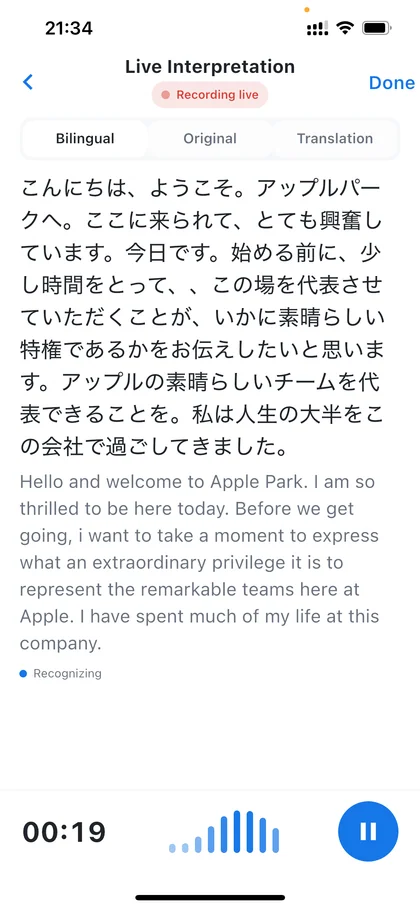
From input to reusable knowledge.
Live Interpretation streams the source transcript and machine translation together, then saves the completed live result and audio in MemoFlow. It does not run a separate post-session refinement pass.
Choose one spoken source language and one written target language
Let the speaker talk naturally
Read the original transcript as it appears
Read the translated text beside it
Continue the conversation and keep the completed session for review
What MemoFlow does at each step.
- Original and translated text
- 60 source and written target languages
- Session history saved to notes
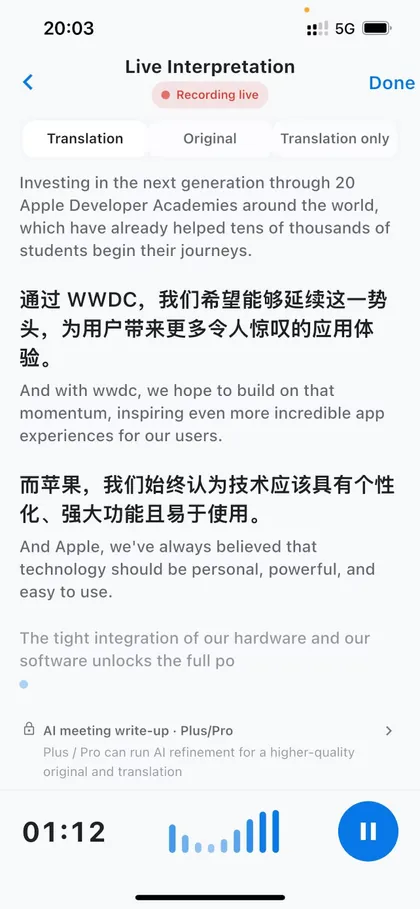
Original and translated text
See both languages inside one shared context.
60 source and written target languages
Choose the source and target that fit the conversation.
Session history saved to notes
Keep the session for review after it ends.
Check a language direction
Configured text direction: English → Simplified Chinese
This checker shows configured language choices. It does not translate audio on the website or measure quality in this direction.
Configured source languages (60)
Live Interpretation uses its own configured source-language set, separate from the 31 meeting transcription languages. Choose one spoken source and one written target for each session. The app shows text, not translated speech.
- Afrikaans
- Arabic
- Asturian
- Azerbaijani
- Bangla
- Belarusian
- Bosnian
- Bulgarian
- Cantonese
- Catalan
- Cebuano
- Chinese
- Croatian
- Czech
- Danish
- Dutch
- English
- Estonian
- Filipino
- Finnish
- French
- Galician
- German
- Greek
- Gujarati
- Hebrew
- Hindi
- Hungarian
- Icelandic
- Indonesian
- Italian
- Japanese
- Javanese
- Kannada
- Kazakh
- Korean
- Kyrgyz
- Latvian
- Macedonian
- Malay
- Malayalam
- Marathi
- Norwegian Bokmål
- Persian
- Polish
- Portuguese
- Punjabi
- Romanian
- Russian
- Slovak
- Slovenian
- Spanish
- Swahili
- Swedish
- Tajik
- Thai
- Turkish
- Ukrainian
- Urdu
- Vietnamese
Translation into 60 languages
Live Interpretation uses its own configured source-language set, separate from the 31 meeting transcription languages. Choose one spoken source and one written target for each session. The app shows text, not translated speech.
- Afrikaans
- Arabic
- Asturian
- Azerbaijani
- Bangla
- Belarusian
- Bosnian
- Bulgarian
- Cantonese
- Catalan
- Cebuano
- Croatian
- Czech
- Danish
- Dutch
- English
- Estonian
- Filipino
- Finnish
- French
- Galician
- German
- Greek
- Gujarati
- Hebrew
- Hindi
- Hungarian
- Icelandic
- Indonesian
- Italian
- Japanese
- Javanese
- Kannada
- Kazakh
- Korean
- Kyrgyz
- Latvian
- Macedonian
- Malay
- Malayalam
- Marathi
- Norwegian Bokmål
- Persian
- Polish
- Portuguese
- Punjabi
- Romanian
- Russian
- Simplified Chinese
- Slovak
- Slovenian
- Spanish
- Swahili
- Swedish
- Tajik
- Thai
- Turkish
- Ukrainian
- Urdu
- Vietnamese
Usage and cost
Basic / Plus
2 Credits / minute
Pro
300 Live Interpretation minutes / month
Plus / Pro
Plus: 700 Credits · Pro: 2000 Credits / month
Pro meeting and Live minute allowances are separate. After an allowance is used, the relevant Credit rate applies. Other AI tasks can use Credits too. Choose and purchase a plan in the app; the store shows the final local price.
Compare plansSave it as a note. Find it when you need it.
Keep the completed live text and audio. Save useful passages as notes to edit, find, and use again. The current flow does not add a post-session translation refinement pass.
Where this goes next.
Real-time understanding is only the first half. Keeping the session means names, decisions, and useful context can be reviewed later instead of disappearing when the conversation ends.
It works with the rest of MemoFlow.
Where to go next
Frequently asked questions
Does MemoFlow translate both speakers automatically?
No. Choose one spoken source language and one written target language for each session. Switch the direction for a different speaker or language; automatic two-way translation is not part of this flow.
Will I hear translated speech?
No. The current app displays original and translated text. It does not play a translated voice.
What do I need to start?
Allow microphone access, connect to the internet and choose the language direction. Check important translations against the original transcript and conversation.
What happens after the conversation?
MemoFlow keeps the completed live result and audio for review. You can save useful text as a note. It does not run a separate post-session translation refinement pass.
Are Live languages the same as meeting transcription languages?
No. The configured Live source and written-target lists each contain 60 languages; AI Meeting offers 31 transcription languages. Configured support does not establish equal quality in every direction.
Bring MemoFlow into your day.
Download MemoFlow and start capturing in the way that fits the moment.
Limited-time welcome offerGet 7 days of Plus free + 50 welcome Credits. Learn more