
AI meeting transcription. Notes you can use.
Follow the transcript while the meeting happens. Review the recording afterwards, then save the conversation as a note for summaries, decisions, and follow-up.
Save it as a note. Find it when you need it.
A reviewed note keeps decisions and next steps available after the call. Note search includes saved transcript text; the recording library does not search transcript words.
Check important details before relying on a transcript or translation.
From input to reusable knowledge.
AI Meeting Notes is MemoFlow’s conversation-to-knowledge workflow: recording, live transcription, and playback are the core flow; Plus and Pro add post-session refinement and an AI meeting write-up that stays in the note workspace.
Record a meeting or import an existing audio or video file
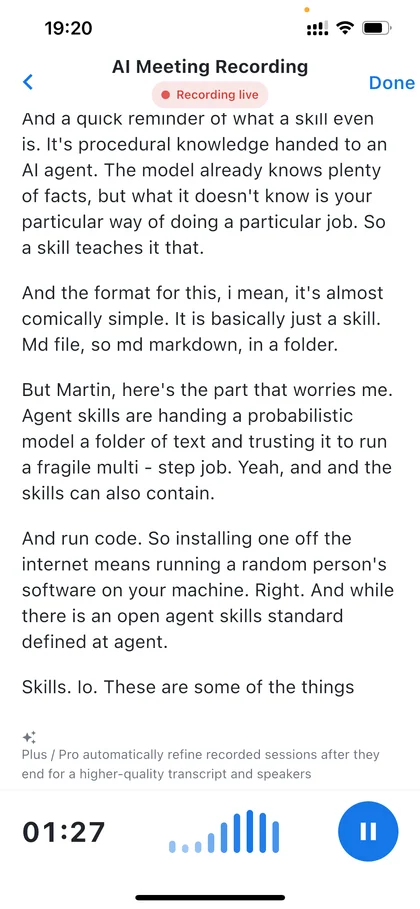
Follow live transcription, or start file recognition after import
Review eligible post-session refinement and speaker attribution
Check names, numbers, decisions, and speakers against the audio
Save the transcript as a note, then generate and review a meeting write-up
Search the saved note, export, share, or select it for MemoFlow AI
What MemoFlow does at each step.
- Live transcription
- Recording library and playback
- AI meeting write-up (Plus and Pro)
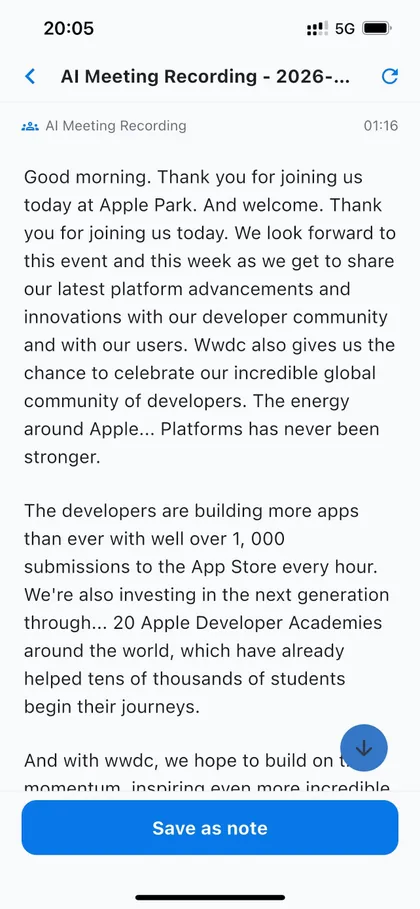
Live transcription
Follow the transcript as the conversation unfolds.
Recording library and playback
Return to important moments from the recording library.
AI meeting write-up (Plus and Pro)
Turn the refined transcript into a meeting note with a summary, decisions, and action items.
Transcription in 31 languages
Live captions during the meeting and the refined transcript afterwards both use the language you choose for the recording. There is no automatic language detection, so choose the language before you start.
- Arabic
- Bulgarian
- Cantonese
- Chinese
- Croatian
- Czech
- Danish
- Dutch
- English
- Filipino
- Finnish
- French
- German
- Greek
- Hindi
- Hungarian
- Indonesian
- Italian
- Japanese
- Korean
- Malay
- Norwegian
- Polish
- Portuguese
- Romanian
- Russian
- Slovak
- Spanish
- Swedish
- Thai
- Vietnamese
Usage and cost
Basic / Plus
1 Credit / minute
Pro
600 AI Meeting minutes / month
Plus / Pro
Plus: 700 Credits · Pro: 2000 Credits / month
Pro meeting and Live minute allowances are separate. After an allowance is used, the relevant Credit rate applies. Other AI tasks can use Credits too. Choose and purchase a plan in the app; the store shows the final local price.
Compare plansSave it as a note. Find it when you need it.
A reviewed note keeps decisions and next steps available after the call. Note search includes saved transcript text; the recording library does not search transcript words.
Need to follow another language during a conversation? Explore Live Interpretation.
Where this goes next.
The recording is evidence, the transcript makes it findable, and the meeting note makes it usable. The result can sit beside project notes and become selected context for later work with MemoFlow AI.
Follow the complete workflow in how to transcribe a meeting.
It works with the rest of MemoFlow.
Where to go next
Frequently asked questions
Can AI transcribe meetings?
Yes. MemoFlow supports live meeting transcription when connected. Recording can continue locally without a connection, but that does not guarantee a live transcript. Check your connection and plan before starting.
Can I record a meeting on iPhone?
Yes. MemoFlow is on the App Store for iPhone and on Google Play for Android. Recording needs microphone permission, and the people in the meeting should agree to being recorded before you start.
How accurate is meeting transcription?
There is no single accuracy figure for every meeting. Microphone distance, noise, overlapping speech, language and specialist terms affect the result. Verify names, numbers, decisions and important quotes against the audio.
Can meeting recordings be searched?
Audio must first become text. Save the transcript as a note to bring its words into note search; a raw recording without a transcript is not a searchable written record.
Can AI generate action items from meetings?
AI meeting write-ups on Plus and Pro can draft decisions and next steps. Confirm each action, owner and deadline with the participants; leave anything unstated as unconfirmed.
Does live meeting transcription work offline?
Recording may continue locally, but live transcription needs a connection. Select the spoken language before recording; the transcript does not automatically change languages.
When are speakers identified?
Speaker attribution is available during eligible post-session refinement. Review speaker labels against the recording before using a meeting write-up.
Can I import a video and search its transcript?
Import a supported video with a decodable audio track, then start AI recognition with Plus or Pro. MemoFlow processes the audio, not video frames. Save the reviewed transcript as a note to search its words.
Can AI draft meeting decisions and actions?
Plus and Pro can draft a meeting write-up from the transcript. Check decisions, owners and deadlines against what was said before saving or sharing it.
Is meeting transcription the same as Live Interpretation?
No. AI Meeting transcribes a selected spoken language for a recording. Live Interpretation displays the original and a written translation during a separate, one-direction session.
Bring MemoFlow into your day.
Download MemoFlow and start capturing in the way that fits the moment.
Limited-time welcome offerGet 7 days of Plus free + 50 welcome Credits. Learn more